
Happy Thanksgiving!
I made this turkey centerpiece out natural products for a very harvest-y looking centerpiece that’s not your traditional cornucopia! …
every mom wants to be an all-powerful wizard
Happy Thanksgiving!
I made this turkey centerpiece out natural products for a very harvest-y looking centerpiece that’s not your traditional cornucopia! …
You may want to know how to install a favicon on your WordPress blog, so that when you apply for Rich Pins on Pinterest your blog name will have the little icon next to it. Or you might just want it so that your website has a nice little icon in a browser tab. I was waiting to install a favicon until I managed to do my complete redesign. But I wanted to go ahead and apply for Pinterest Rich Pins, so I decided to make a “quick” temporary favicon and install it on my WordPress website. (Maybe my tutorial will help it be quicker for you!) I’m currently running the Twenty-twelve theme, but since I used a plugin to generate and install the favicon, this should work for most other themes as well….
I’d like to backup all of the documents on my computer hard drive to the cloud. For cloud storage I use Dropbox.
(If you want to set up your backups the same way and you don’t have Dropbox yet, if use the link above, or this link to Dropbox ,we both get 500 megabytes of free extra bonus space! To get the free extra space, you must download Dropbox to your computer and verify your email with Dropbox. You need to do that to be able to use Dropbox the way I’m going to show you anyway, so it’s not an extra step. They have a great tutorial to get you started. Also, when you sign up using that link, I get your email, but I won’t use it or sell it. If you want to get my newsletter, please sign up at the top of this page.)
So, if you signed up for Dropbox and downloaded it to your computer, you now have a Dropbox folder on your computer. This is where you put all the files you want backed up to Dropbox.
Most programs when you save a file for the first time will automagically find your “Documents” folder on your hard drive and save things to there. So, naturally, it seems like you should just drag, copy that file into your Dropbox folder. But you can’t. …
What does storage in the cloud mean? Everyone says I should be backing-up in the cloud — what does it mean?…
 Where does Scrivener for Windows save files – your working copies?
It seems obvious, I know. But if you were overwhelmed by all of Scrivener’s features and didn’t pay much attention when you created your first project, you might not have paid attention to where your files were being saved.
Scrivener saves your project working copies to where you designate when you first create it.
This is also the place where Scrivener auto-saves every time your Scrivener screen goes idle for 2 seconds. And it’s going to be saved directly over your old file, just like if you had used File>Save or Ctrl + S in your old word processor. (Oh, who are we kidding? Everyone used Microsoft Word.)…
 One of our favorite attractions at Disney Hollywood Studios was The Magic of Animation: Animation Academy at the Animation Station. My daughters are both artistic, so they were dying to go to a class, even though it meant devoting at least and hour out of a packed schedule. (Classes are generally every 30 minutes, but are often full, so be sure to check the schedule.) We sent the guys off to enjoy repeated rides on the Star Wars ride Star Tours: The Adventures Continue, while the girls headed to the class. In second week of June, we arrived early for the second-to-last session of the day, and didn’t have any trouble getting in….

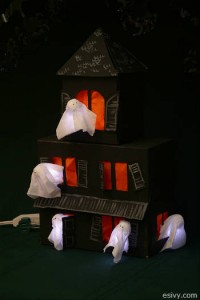 Instructions for the tissue box haunted house with tissue ghosts can be found at the post Make Your Own Halloween Decorations: Tissue box haunted house. Happy Crafting!
What girl wouldn’t love a mermaid birthday party? With lots of cute cake ideas, party favors, costumes, crafts, marine themed decorations and games, your party is sure to be a success!
 …
…
 Scrivener is an amazing piece of writing software! It’s great for constructing a novel or even keeping track of all your blog posts. But it has a few moving parts.
At some point in learning how to use it you probably have the urge to GET BACK TO WRITING ALREADY. If you’re at that point, but are smart enough to not start off without being absolutely sure you’re backing up to the right places, I’m going to fully explain how to do that. Or if you’re like me, and hobbled together a backup “somewhere” and mailed yourself backup files “just in case” and were relying on “Recent documents” to find what you’ve been working on – you might have quite a mess. Here’s how to figure out a place to put things….
What is a flash drive?
Are you asking that question? If you’re still feeling lost without a floppy disk to safely back up your computer files, you’ll find this quick tutorial on the current types of external, removable storage media handy.
 …
…